Prompt to Polygon: Testing 10 AI Models on Editable Vector Logo Generation. The Results Were Weird.
This report is unapologetically from my own perspective. It reflects how I evaluate AI logo generation inside Logo Lattice, what I care about in production, and the failures I personally find most costly.
That probably makes it fairly pointless as a universal benchmark, but I still think it is interesting: once you force models to produce structured, editable vector geometry instead of pretty pixels, their strengths and weaknesses become very obvious.
Most AI logo tools generate a flat image and stop there. Logo Lattice does something harder. It converts a text prompt into editable, grid-snapped vector geometry that survives a real production pipeline.
{
  "format": "logolattice",
  "version": 1,
  "snapshot": {
    "document": {
      "shapes": [
        {
          "id": "fd17ccba-913c-4396-917a-fe99f1d30591",
          "points": [
            { "x": 390, "y": 329.0896534380867 },
            { "x": 360, "y": 311.7691453623979 },
            { "x": 390, "y": 294.44863728670913 },
            { "x": 420, "y": 311.7691453623979 }
          ],
          "style": {
            "stroke": "#111111",
            "fill": "#6fbaff",
            "strokeWidth": 1
          },
          "layerNumber": 1,
          "groupId": "e17a92e4-fd04-4962-867f-d1a600c74108"
        }
      ],
      "groups": 2
    },
    "gridType": "isometric",
    "isometricStyle": "triangular",
    "gridSize": 60,
    "style": {
      "stroke": "#111111",
      "fill": "#488ccd",
      "strokeWidth": 3
    }
  }
}
That means the model isn't just "being creative". It has to:
- Return valid structured JSON
- Follow a lattice coordinate system
- Generate usable geometry
- Survive normalisation
- Export clean SVGs
So, I built a benchmark and tested every generative model enabled in our development build. The results were far less predictable than expected.
The benchmark
I ran 10 models, 4 logo prompts, 3 times each, for a total of 120 generations.
Models
| OpenRouter id | Label |
|---|---|
openai/gpt-5.2 | GPT-5.2 |
openai/gpt-5.5 | GPT-5.5 |
openai/gpt-5.4 | GPT-5.4 |
anthropic/claude-sonnet-4.6 | Claude Sonnet 4.6 |
anthropic/claude-opus-4.8 | Claude Opus 4.8 |
anthropic/claude-opus-4.7 | Claude Opus 4.7 |
anthropic/claude-opus-4.6 | Claude Opus 4.6 |
google/gemini-2.5-pro | Gemini 2.5 Pro |
openai/o4-mini | o4-mini |
deepseek/deepseek-v4-pro | DeepSeek V4 Pro |
Prompts
| Case id | Prompt (summary) | Expectations |
|---|---|---|
teal-mountain | Isometric teal mountain mark | ≥3 shapes, teal, isometric grid |
minimal-circle | Orange circle on square grid | 1–6 shapes, orange, square grid |
complex-facets | Purple/gold faceted gem | ≥5 shapes, purple + gold |
arc-swoosh | Navy open arc on isometric grid | ≥1 shape, navy, isometric grid |
Every run went through the same production pipeline:
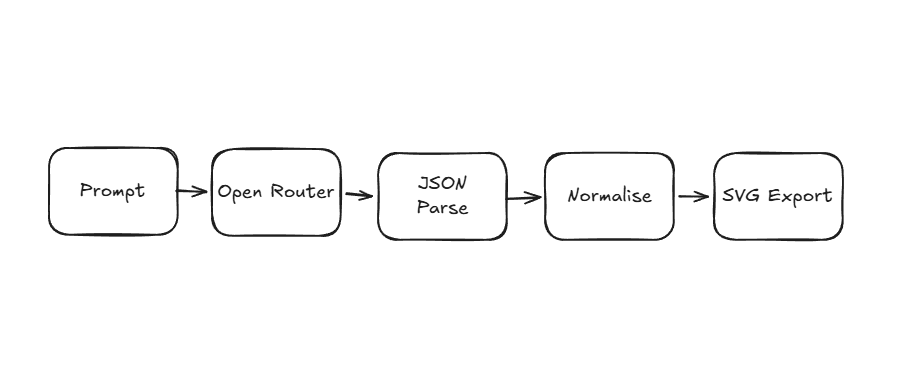
- No tuning per provider was implemented
- Each try uses the same system prompt, same post-processing and same scoring rules
This was not a "which image looks coolest" benchmark. We measured reliability.
Metrics included:
- Structured output validity
- Parse rate success
- Grid adherence
- Shape complexity
- Colour fidelity
- SVG export success
- Latency
- Token usage
- Cost
The biggest surprise
Most models succeeded... but the failures mattered.
Overall success rate: 117/120 successful generations (97.5%)
Failure cases
| Model | Case | Run | Error | Latency |
|---|---|---|---|---|
google/gemini-2.5-pro | complex-facets | 1, 2 | Empty response | ~2–3 min |
anthropic/claude-opus-4.6 | ? | ? | Invalid JSON | … |
In theory, that sounds excellent. But the failures exposed something important. When users spend credits on generation, even a 2–3% failure rate becomes very noticeable - especially when failures take 2–3 minutes before timing out.
{
  "model": "google/gemini-2.5-pro",
  "caseId": "complex-facets",
  "run": 2,
  "ok": false,
  "latencyMs": 165505.65229100036,
  "error": "OpenRouter returned no content."
},
{
  "model": "google/gemini-2.5-pro",
  "caseId": "complex-facets",
  "run": 3,
  "ok": false,
  "latencyMs": 199037.96783299977,
  "error": "OpenRouter returned no content."
}
The second surprise
"Good scores" does not always mean "good logos".
The benchmark exposed a weird gap between machine-valid output and human-perceived quality. A model could score extremely high while still generating decagons instead of circles, awkward nested arcs, overbuilt geometry and strange compositions that technically passed validation.
The easiest prompt in the benchmark, creating a simple orange circle, ended up exposing some of the biggest weaknesses.
Prompt: "Simple orange circle on square grid, flat geometric logo mark"
Several top-tier models generated polygon approximations instead of circles.
Example benchmark results
| Model | Score | shapeCount | gridSnapError | Visual |
|---|---|---|---|---|
| GPT-5.5 | 100 | 12 | 0.4 | decagon "circle" |
| Opus 4.8 | 100 | 6 | 0.1 | decagon "circle" |
| DeepSeek | 91 | 1 | 0.0 | single horizontal line |
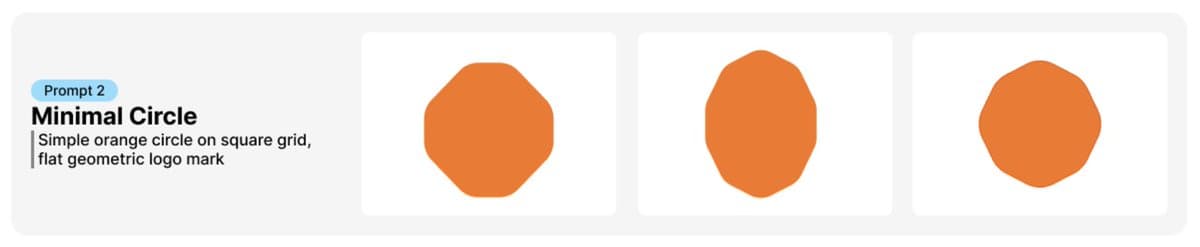
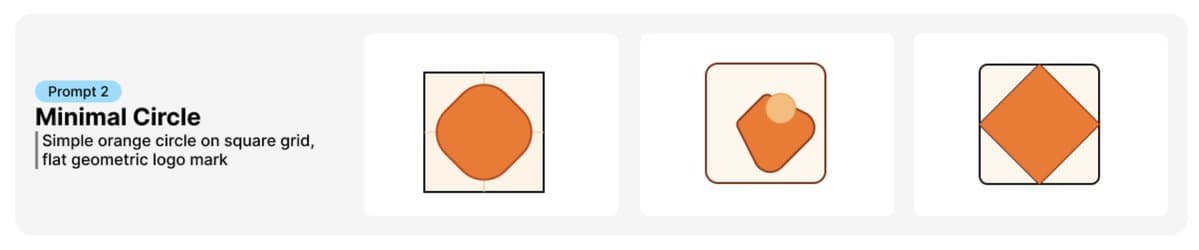
One DeepSeek run returned a single horizontal line.
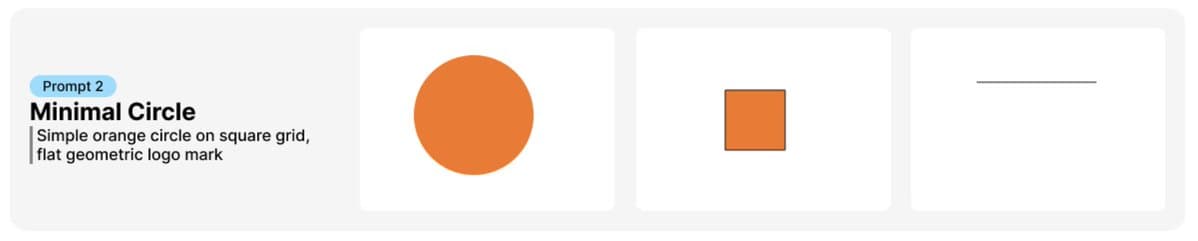
Technically, it was valid. Visually, it was absurd.
JSON output (truncated - GPT-5.5, minimal circle, run 1)
{
  "format": "logolattice",
  "version": 1,
  "exportedAt": "2026-05-30T18:24:06.438Z",
  "snapshot": {
    "document": {
      "shapes": [
        {
          "id": "5b6a5c6b-5d9b-4b68-9e7d-4b2c0b2f5f3a",
          "points": [
            { "x": 390, "y": 240 },
            { "x": 450, "y": 240 },
            { "x": 510, "y": 300 }
          ],
          "style": {
            "stroke": "#f97316",
            "fill": "#f97316",
            "strokeWidth": 1
          },
          "layerNumber": 1,
          "closed": true,
          "vertexCornerRadii": [36, 36, 36, 36, 36, 36, 36, 36]
        }
      ]
    },
    "gridType": "square",
    "gridSize": 60,
    "style": {
      "stroke": "#f97316",
      "fill": "#f97316",
      "strokeWidth": 1
    }
  }
}Simple briefs became the harshest quality test in the entire suite. Complex prompts gave models room to design; simple prompts forced precision.
Complex prompts were actually easier
The strongest outputs happened on higher complexity prompts, such as isometric mountains, faceted gems and layered geometric marks. Those prompts gave models more room to "design". Simple prompts forced precision.
That became a recurring pattern across all 120 generations. In other words: simple briefs exposed geometry problems. Complex briefs exposed creativity differences.
Shape count distribution for passed runs
Benchmark scores capture visual correctness, but not how efficiently models achieve it. To examine structural behaviour, I analysed the number of shapes used in successful outputs for the simple circle benchmark.
Ideally, a circle should be represented by a single shape. The chart below shows that while many models achieved this minimal representation, others produced more complex constructions to reach a visually similar result - revealing differences in structural efficiency beyond overall score.
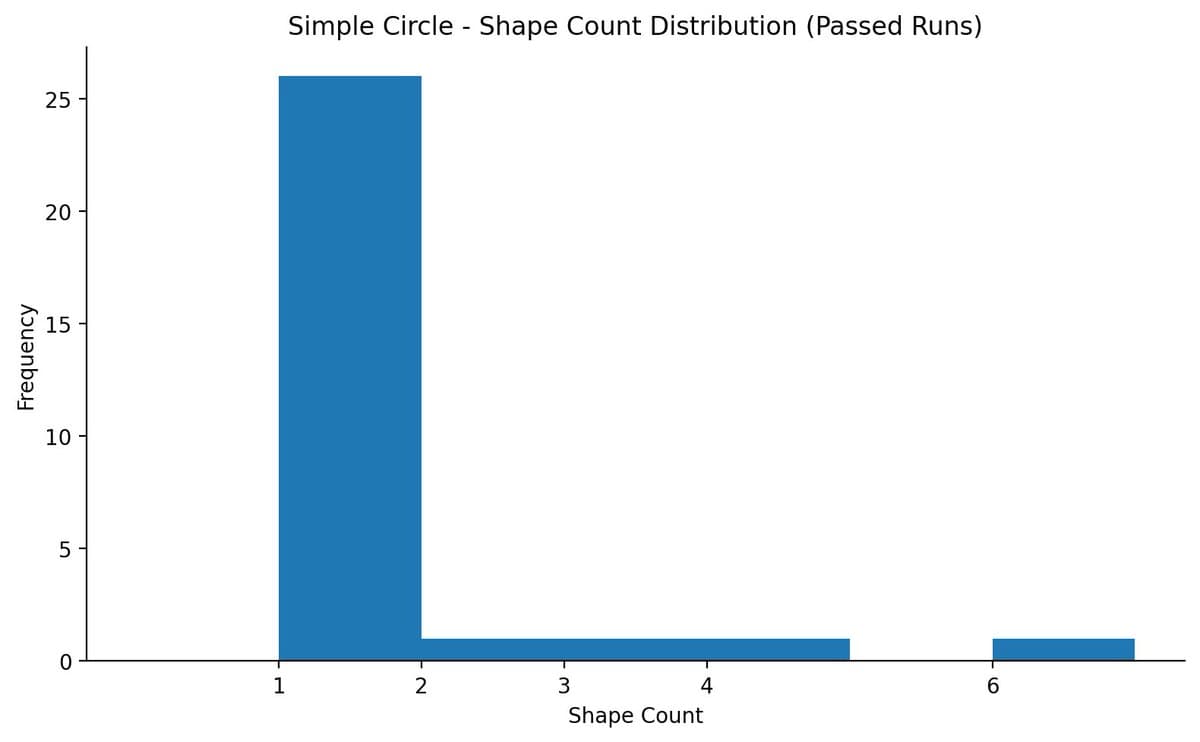
Interesting result from the data:
- 26 runs passed with 1 shape (the "correct" minimal circle)
- 1 run passed with 6 shapes (the decagon / polygon approximation)
- A few odd middle cases (2, 3, 4 shapes)
That actually tells a pretty compelling story for the benchmark: some models "pass" while taking a much more complex route to achieve the same visual result. This highlights structural efficiency, not just visual correctness.
Grid adherence and vertex drift
To measure geometric precision beyond simple parse success, I included gridSnapError - a metric that captures the average distance between raw vertices and their normalised grid-aligned positions prior to snapping. This measures pre-normalisation vertex drift, rather than simply whether an output could be parsed.
export function gridSnapError(
  rawSnapshot: EditorSnapshot,
  normalizedSnapshot: EditorSnapshot,
): number {
  // ... average distance from each raw vertex to snapped grid position
  return count === 0 ? Number.POSITIVE_INFINITY : total / count;
}
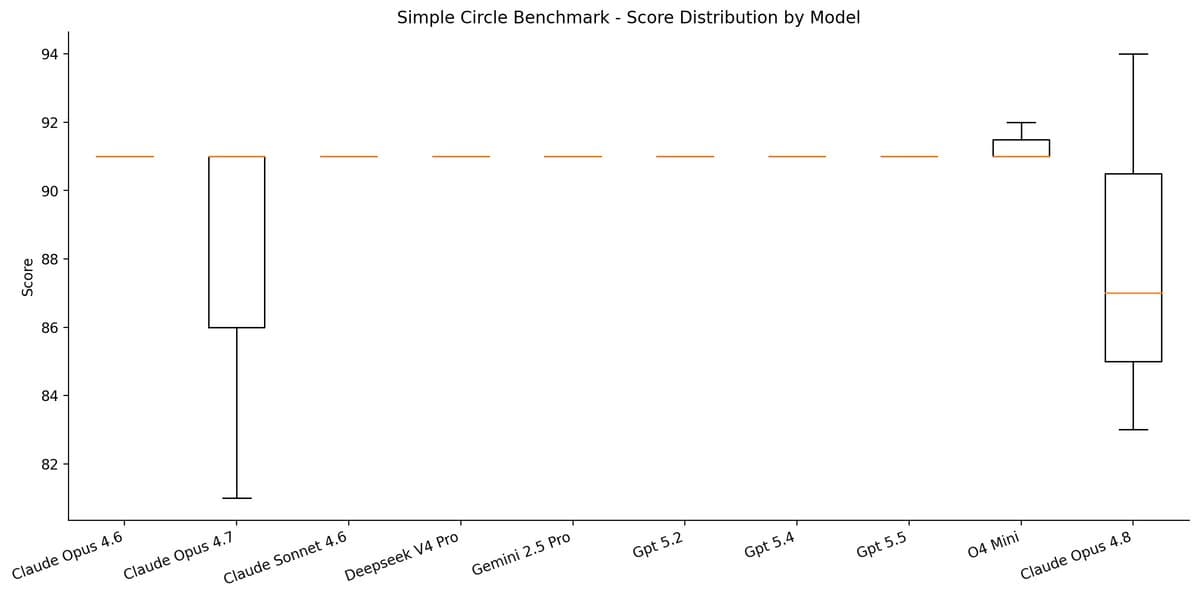
As a result, benchmark scores frequently cluster between 91–100, reflecting that many models achieve strong grid adherence even when overall composition or semantic correctness is weaker. In practice, this helps separate structural precision from higher-level design quality.
Model highlights
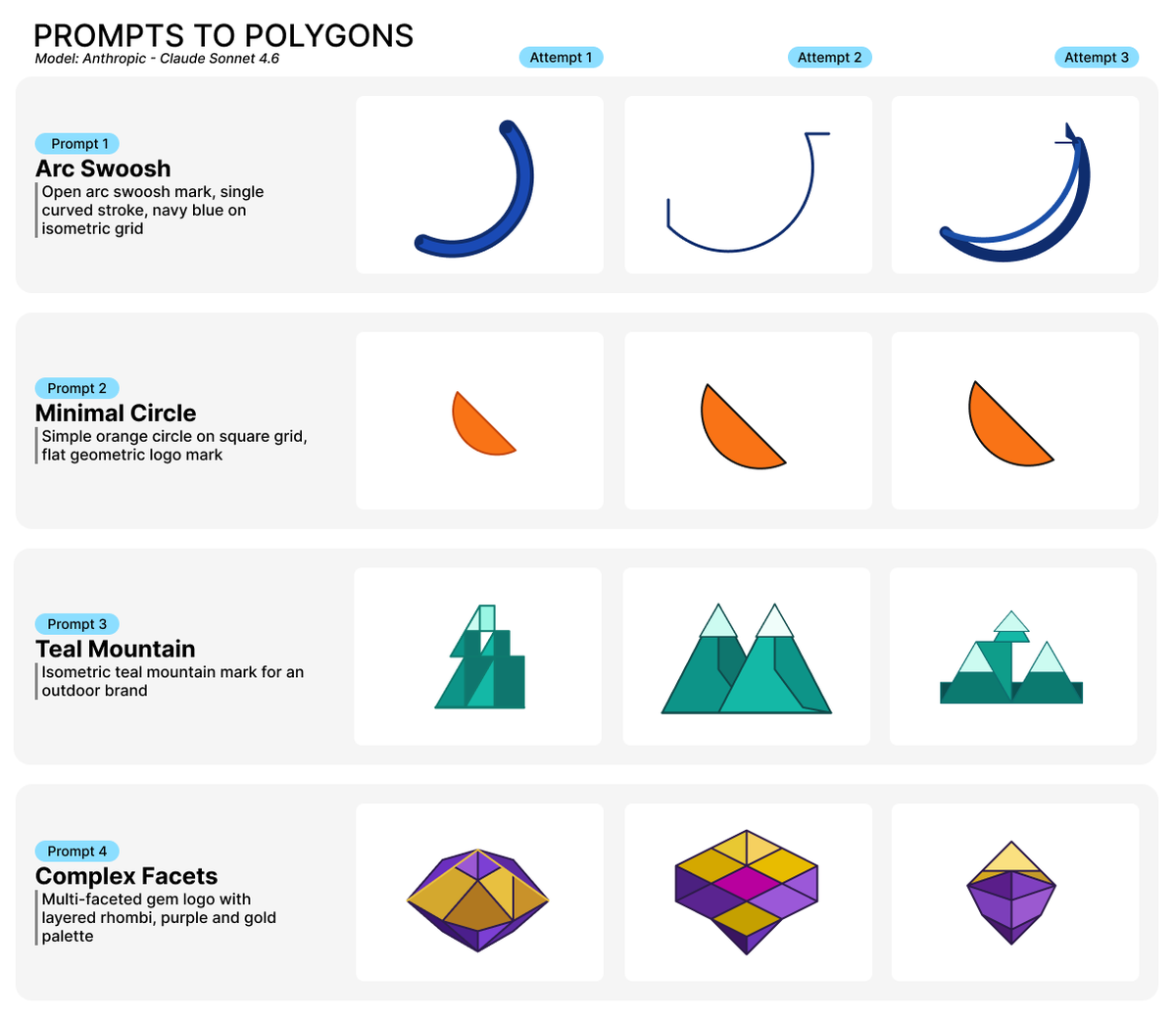
Claude Sonnet 4.6 was the most interesting model
Not because it had the highest raw score. Because it consistently hit the best balance of quality, reliability, speed and cost. Typical generations were often 5–25 seconds, whilst still producing some of the best complex marks in the benchmark.
Its outputs felt the most like a designer made it, rather than an AI assembled some shapes. Oddly though, it struggled on very simple geometry. Its "circle" attempts were sometimes worse than smaller models.
| Metric | Value |
|---|---|
| Model | anthropic/claude-sonnet-4.6 |
| Success rate | 47/48 (97%) |
| Median latency | 13.2s |
| P95 latency | 23.1s |
| Total cost | $1.92 |
| Avg completion tokens | 1,281 |
| Best case | teal-mountain (score 98) |
| Weakest case | arc-swoosh (score 87) |
GPT-5.5 was strong but expensive
GPT-5.5 produced consistently high-quality outputs. But it also costs roughly 4× more than its smaller sibling, o4-mini, for the same benchmark suite - and visually, the difference was almost smaller than expected. In several cases, cheaper models produced equally usable marks.
| Metric | Value |
|---|---|
| Model | openai/gpt-5.5 |
| Success rate | 12/12 (100%) |
| Median latency | 28.9s |
| P95 latency | 74.5s |
| Total cost | $0.78 |
| Avg completion tokens | 2,078 |
| Best case | complex-facets (score 98) |
| Weakest case | arc-swoosh (score 87, inconsistent curve geometry) |
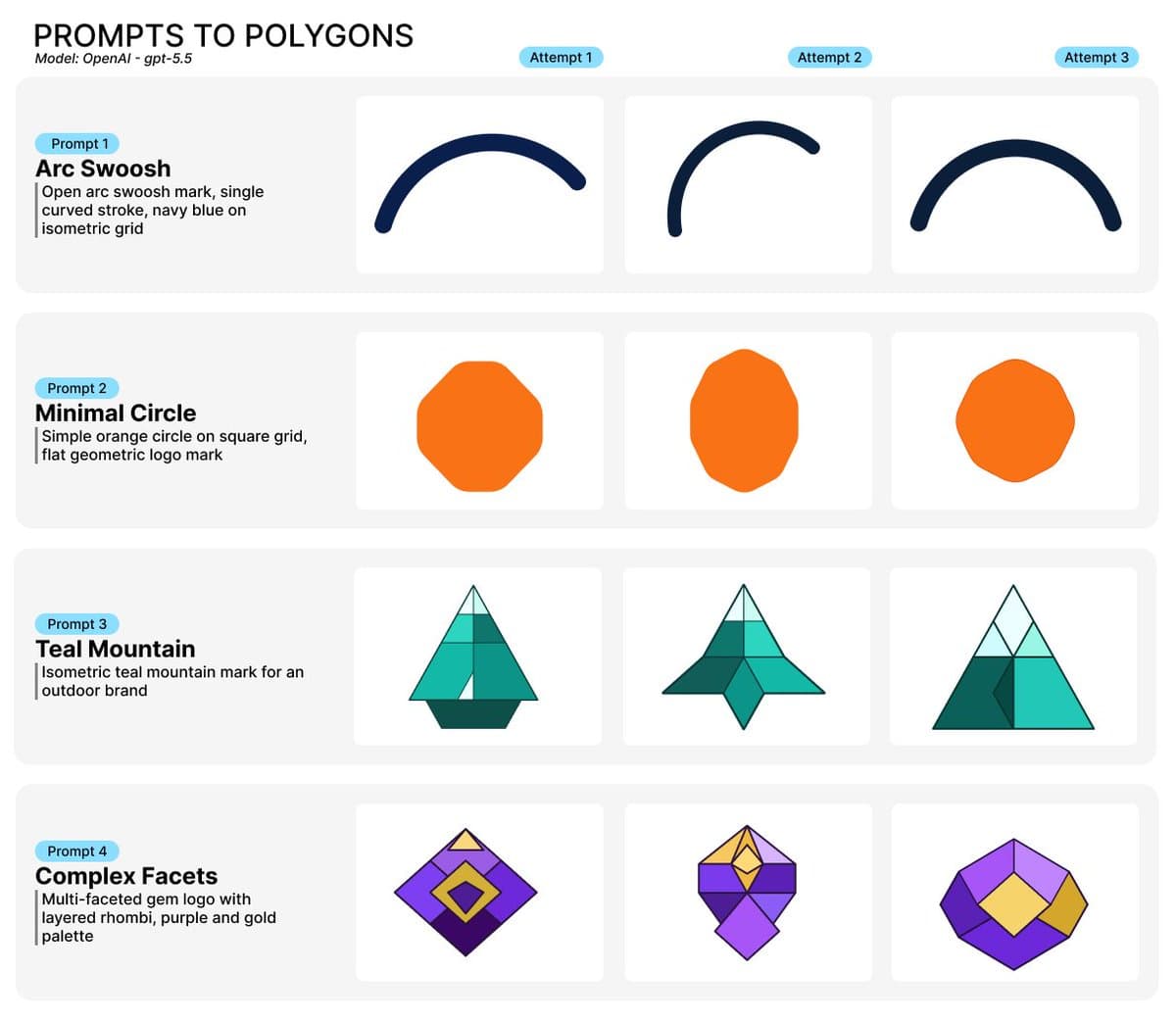
DeepSeek was the chaos model
DeepSeek V4 Pro was easily the most unpredictable system we tested. Some runs were genuinely excellent, others looked completely broken. Latency was similarly inconsistent: some generations finished in under 10 seconds, whereas others took nearly 4 minutes.
It behaved like a lottery ticket: occasionally amazing, occasionally bizarre. One DeepSeek generation exceeded 13,000 completion tokens for a single logo attempt.
| Metric | Value |
|---|---|
| Model | deepseek/deepseek-v4-pro |
| Case | complex-facets |
| Run | 1 |
| Score | 95 |
| Success | ✅ |
| Completion tokens | 13,873 |
| Prompt tokens | 1,959 |
| Total tokens | 15,832 |
| Latency | 239.1s |
| Cost | $0.0453 |
| Shape count | 8 |
| Grid snap error | 2.64 |
| SVG size | 2,399 bytes |
The benchmark repeatedly showed that output complexity, not prompt size, drove costs. Prompt tokens were relatively stable across all models. Completion tokens exploded on harder prompts.
| Metric | Value |
|---|---|
| Model | deepseek/deepseek-v4-pro |
| Success rate | 12/12 (100%) |
| Median latency | 93.1s |
| P95 latency | 207.4s |
| Total cost | $0.19 |
| Avg completion tokens | 4,462 |
| Best case | teal-mountain (score 96) |
| Weakest case | arc-swoosh (score 81) |
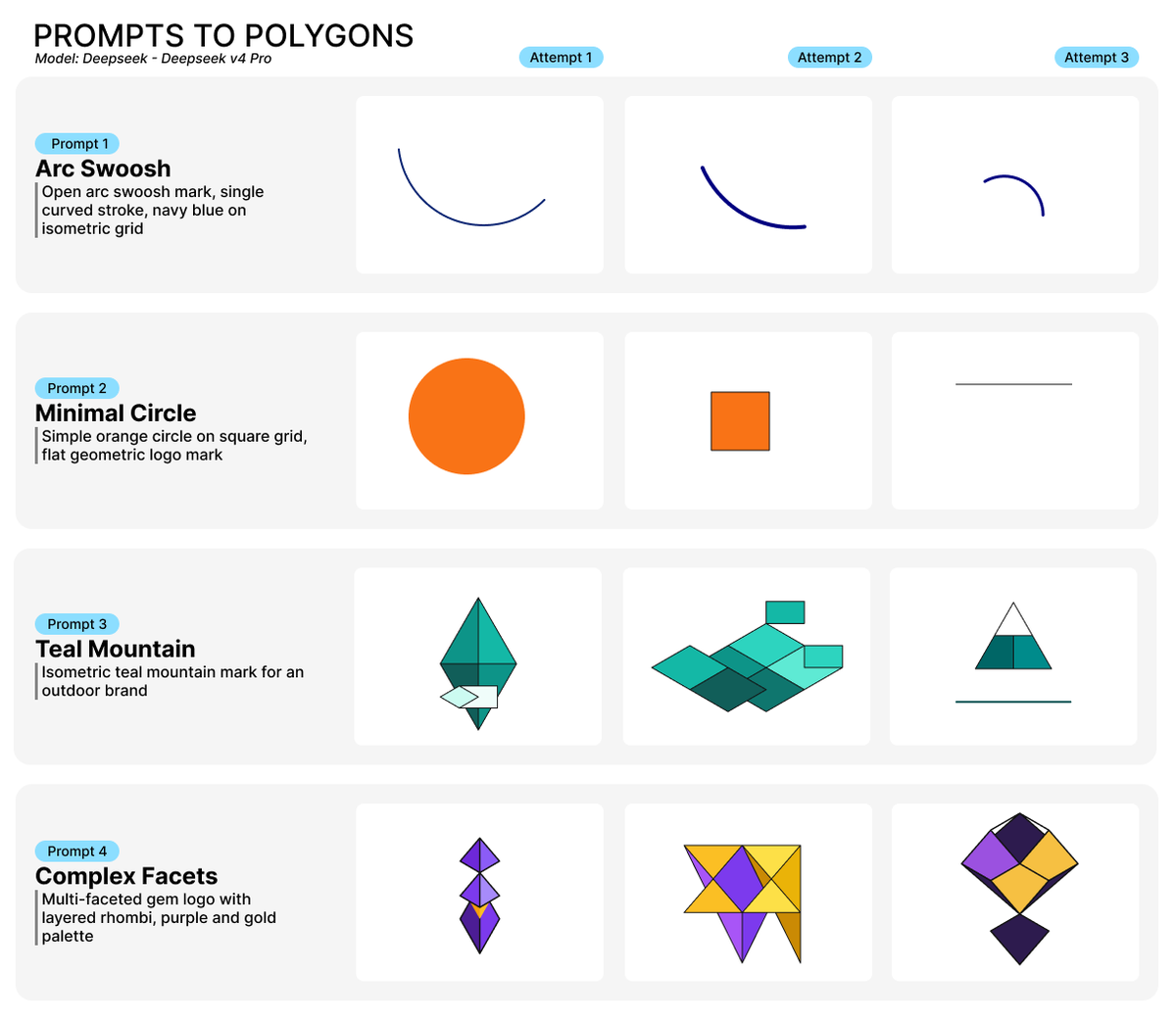
Gemini's results were frustrating
Because when Gemini worked, it often looked good. Its successful outputs were clean, minimal and visually sharp. But the empty responses and thin geometry made the model difficult to trust for production defaults. Reliability matters more than the occasional brilliance when generations cost money.
| Metric | Value |
|---|---|
| Model | google/gemini-2.5-pro |
| Success rate | 10/12 (83%) |
| Median latency | 40.1s |
| P95 latency | 180.6s |
| Total cost | $0.47 |
| Avg completion tokens | 4,496 |
| Best case | teal-mountain (score 93) |
| Weakest case | complex-facets (score 79) |
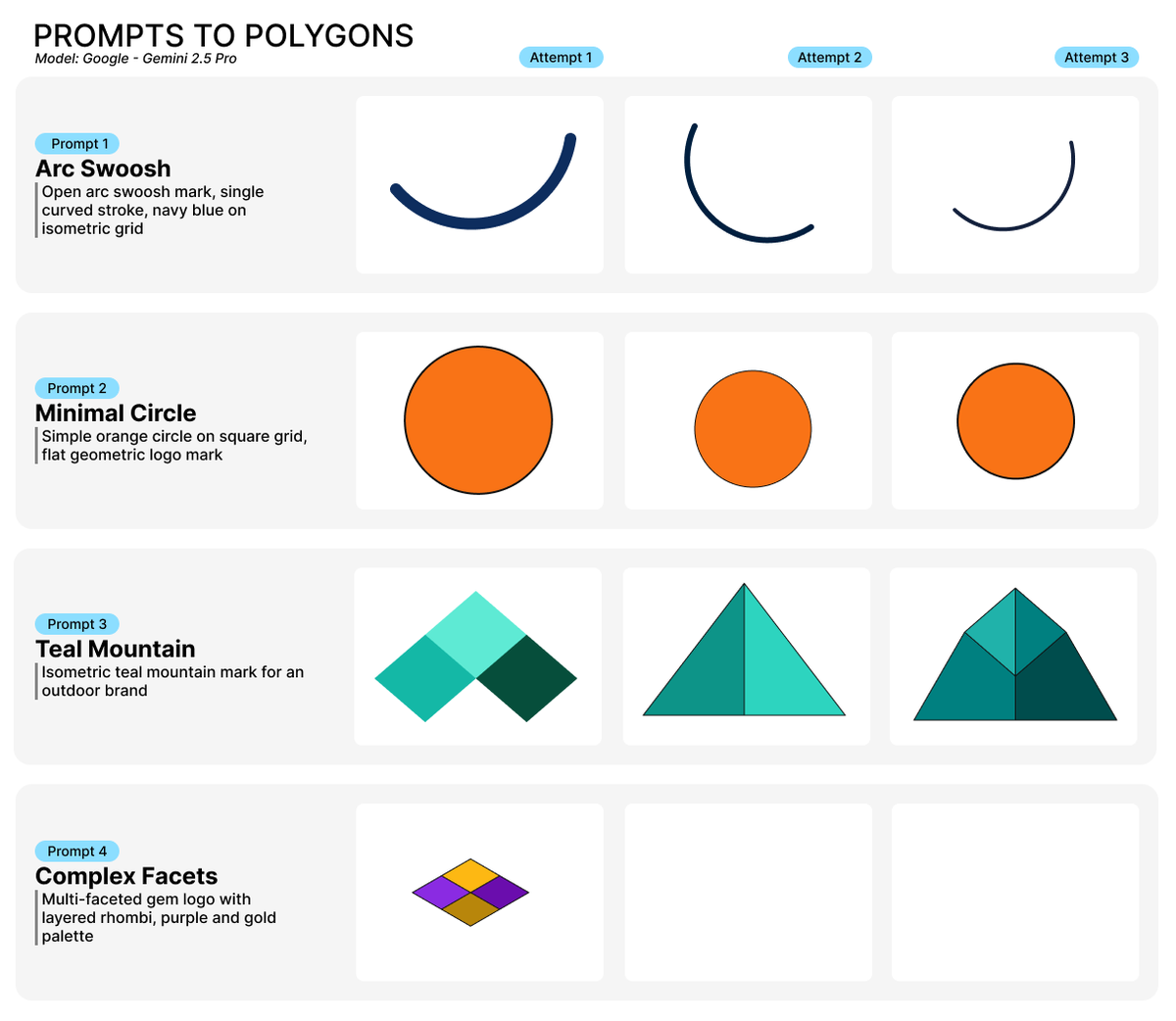
The benchmark also exposed a scoring problem
Each successful run gets a 0–100 composite score from machine-checkable checks: non-empty output after normalisation, minimum shape count, grid snap error, colour-hint match, SVG export, a small complexity bonus, and light penalties for wrong grid type or too many shapes.
Composite score (0–100)
| Component | Points | Rule |
|---|---|---|
| Non-empty logo | +40 | At least one shape after normalisation |
| Minimum complexity | +15 | shapeCount >= minShapes (default minShapes is 1) |
| Grid adherence | 0–15 | Pre-normalisation vertex snap error (see below) |
| Colour fidelity | +10 | colorHintMatch === true |
| SVG export | +10 | svgBytes > 0 |
| Complexity bonus | 0–10 | min(10, shapeCount) |
| Too many shapes | −5 | Only when maxShapes is set and exceeded |
| Wrong grid type | −5 | Expected square or isometric and snapshot doesn't match |
export function scoreDescribeSnapshot(...) {
  let score = 0;
  score += shapeCount > 0 ? 40 : 0;
  // minShapes +15, grid snap 0–15, color +10, SVG +10, complexity bonus...
}
Grid adherence
| gridSnapError | Points |
|---|---|
| < 2 px (average) | +15 |
| ≥ 2 px | +max(0, 15 − error) (capped at 15) |
gridSnapError = average distance from each raw vertex to its snapped grid position (before normalisation).
Most successful runs clustered between a score of 91 and 100. So raw score alone wasn't very useful. The real differences appeared in:
- Geometry quality
- Consistency
- Shape decisions
- Prompt interpretation
- Visual polish
- Reliability under repetition
In other words, the benchmark became more interesting when we looked at the SVGs, instead of the numbers.
Biggest overall findings
-
Structured vector generation is much harder than image generation - Generating pretty pixels is easy compared to generating valid geometry, coherent structure, editable vectors, and machine-readable layouts. Many models that are excellent at image tasks struggled with geometric discipline.
-
Simplicity is deceptive - A "minimal circle" sounds trivial. But simple prompts leave nowhere to hide. You instantly notice polygon artefacts, asymmetry, awkward spacing and excessive geometry. Simple briefs became the harshest quality test in the entire suite.
-
Reliability matters more than peak quality - The benchmark changed how we think about defaults. A model that occasionally produced incredible work, but sometimes fails entirely, creates a worse product experience than a model that is consistently good - especially in a credit-based generation flow.
-
High scores do not equal aesthetic quality - Automated metrics are useful but they do not fully capture balance, composition, silhouette quality, logo "feel" and visual confidence. Human review still matters enormously.
Master model comparison
| Model | Success Rate | Median Score | Median Latency | P95 Latency | Total Cost | Avg Completion Tokens | Best Case | Weakest Case |
|---|---|---|---|---|---|---|---|---|
| GPT-5.5 | 12/12 (100%) | 92 | 28.9s | 74.5s | $0.78 | 2,078 | complex-facets (98) | arc-swoosh (87) |
| Claude Sonnet 4.6 | 47/48 (97%) | 95 | 13.2s | 23.1s | $1.92 | 1,281 | teal-mountain (98) | arc-swoosh (87) |
| DeepSeek V4 Pro | 12/12 (100%) | 92 | 93.1s | 207.4s | $0.19 | 4,462 | teal-mountain (96) | arc-swoosh (81) |
| Gemini 2.5 Pro | 10/12 (83%) | 88 | 40.1s | 180.6s | $0.47 | 4,496 | teal-mountain (93) | complex-facets (79) |
The models, in one sentence each
| Model | Summary |
|---|---|
| Claude Sonnet 4.6 | Best overall balance |
| Claude Opus 4.6 | Strong ideas, weak fundamentals |
| Claude Opus 4.7 | Most consistently "brand-ready" |
| Claude Opus 4.8 | Creative but inconsistent |
| o4-mini | Cheap, clean, surprisingly capable |
| GPT-5.2 | Reliable and symmetrical |
| GPT-5.4 | Excellent on complex geometry |
| GPT-5.5 | Strong, but expensive |
| Gemini 2.5 Pro | Sharp when it works |
| DeepSeek V4 Pro | Pure variance |
The most important takeaway
The benchmark made one thing very clear. "AI generated SVG" is not a solved problem.
Getting a model to generate aesthetically strong, structurally valid, editable, normalised, export-safe vector geometry is still surprisingly difficult - especially when the outputs need to survive a real product pipeline instead of just looking good in a screenshot.
And honestly? That's what made this benchmark interesting. Not which model got the highest score, but how differently each model failed.
What's next
We're expanding the benchmark with:
- Reference-image prompts
- More stroke-based tests
- Multi-turn refinement
- Larger sample sizes
- Human ranking evaluation
Because after looking through all 120 outputs, one thing became obvious: the future of AI design tools is probably less about image generation, and more about controllable structure.
Appendices
Full per-model output galleries and detailed breakdowns are available in the Describe-Benchmark repository:
- Anthropic results
- OpenAI results
- Gemini and DeepSeek results
Raw results and reproducibility
I am currently working on a way to open source the benchmark. At the moment, too much of the benchmark relies on code I do not want to open source.
In the meantime, you can view the full results and raw outputs on GitHub → logolattice/Describe-Benchmark
Originally posted on X on 2 June 2026.